Play
the Video for a short introduction on
how MD4000 nodes are quickly and
easily configured. (full screen
mode enabled)
Comprehensive Network Management System (NMS). The MD4000 Network Management System (NMS) provides the ability to configure, monitor and analyze the
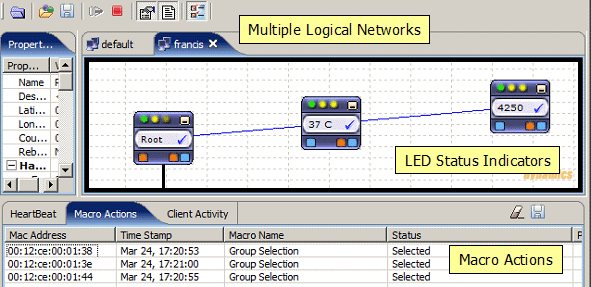
MD4000 mesh network. Based on Java technology, the NMS runs on any PC with the Java runtime environment. MD4000 nodes appear as graphical widgets with multiple LED status indicators, allowing point-and-click management of the units. The status window on the bottom window reports the current state of all nodes based on their recently received heartbeat. Heartbeat data includes transmit rate, signal strength, board temperature, packets moved etc. The left hand side properties window provides detailed information for a selected node including AP client activity.
Intuitive Interface: Step by Step instructions (in both
video and document format) cover all
aspects of node configuration
including setting the parameters for
Security, VLANs, 802.11e based QoS.
Extensive security and VLAN features
such as 802.11p and 802.11q allow
multiple classes of users to be
served by one network and provide
timely delivery of voice and video.
802.11e ensures timely delivery of
video and VOIP over wireless. A
command line interface is also
available for advanced users and
script developers.
RF
Interference Maps:
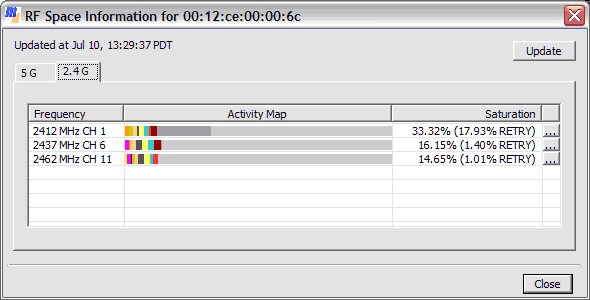
The NMS also provides a
comprehensive view of the Radio
Frequency (RF) space. The RF
instrumentation built into each
MD4000 unit shows how saturated or
busy the medium is. The NMS displays
details of the number of networks,
the saturation level for each
frequency. Network-wise medium usage
is also displayed for each
frequency. [Image
Of RF saturation]
Remote
Technical Support, Remote Software
upgrades. With your permission
our trained technical support staff
can access your mesh network and
configure/upgrade nodes remotely.
Our staff can also "tune"
network parameters remotely.
GPS
Position Location Support MD4000
mesh nodes may be equipped with a
GPS receiver. The GPS information is
integrated into the NMS. The
location of Mobile Mesh Nodes
equipped with GPS will be
automatically updated with each
heart beat. The NMS uses maps imported from
www.openstreetmap.org and
dynamically manages the background
image movement to ensure that
current locations are correctly
depicted) [The GPS radio does not
use a radio slot - up to four
radio cards are still supported in
each node].
OEM Application
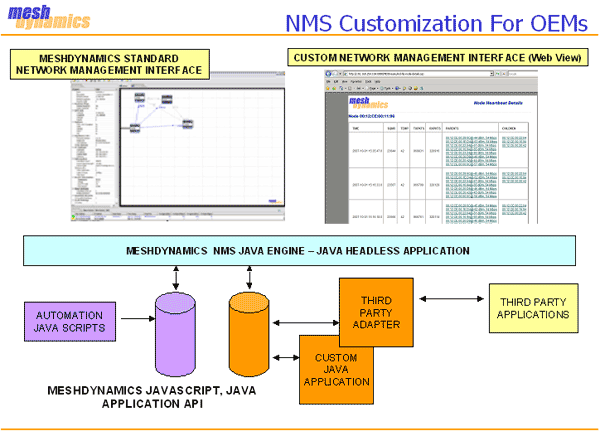
Development. The NMS at its core is a headless
Java Engine and the API
supports both JavaScript and Java
for automation scripts, packet
analysis and third party application
integration. For example, custom application software on mesh nodes polls
sensors via the serial line interface on the node. The sensor data is processed
in
the node and then routed across the mesh. The
processed data is recorded in a
remote database. See: NMS
Headless Java Engine, NMS
API Overview Video, NMS
API Documents
NMS Related Links
1.
MeshDynamics
NMS Video
Step by step Instructions on configuring
nodes' basic parameters.
2.
MD4000 Product Brochure
Includes technical specifications
and standard product configurations
3.
MD4000 Deployment Guide Guidelines on antenna selection, model
configuration, trouble shooting
4.
MD4000
Network Configuration Guide Detailed
instructions on setting SSID, Encryption,
QoS, VLANs etc
5.
MD4000 NMS Branding
Guidelines
For OEM Customer
branding/customization of NMS.
6.
MD4000 NMS API Documentation and Scripting Interface For
OEM developers. Requires access to the NMS
SDK/Source code. .